
FAQ
-
Q
[Website] What if I want to revise my online application?
AApplicants are able to save and revise their online application until the application deadline, even if they finalized the application and paid the application fee. After the deadline is over, it is no longer possible for applicants to edit their application.
-
Q
[Website] How to Use the POSTECH Admissions Website
A1. Create an applicant account
: https://adm-g.postech.ac.kr/ENG/login/?mode=REGProvide accurate information, as this personal information will be used to confirm successful applicants and register admission information.
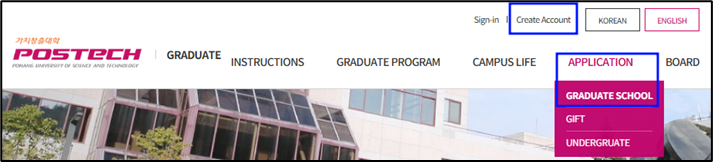
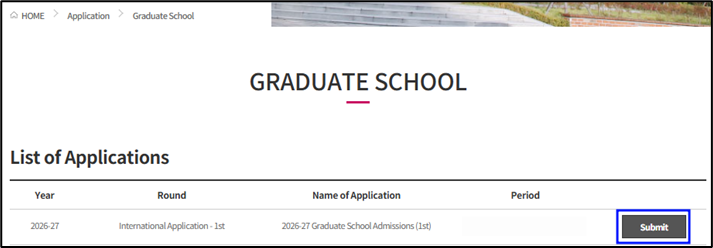
2. Applying
Find the application list and complete the application form following the steps below.
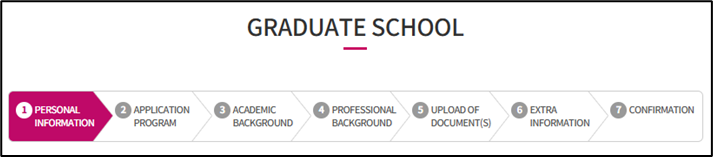
3. My Dashboard menu
View your saved applications, complete th application during the application period.
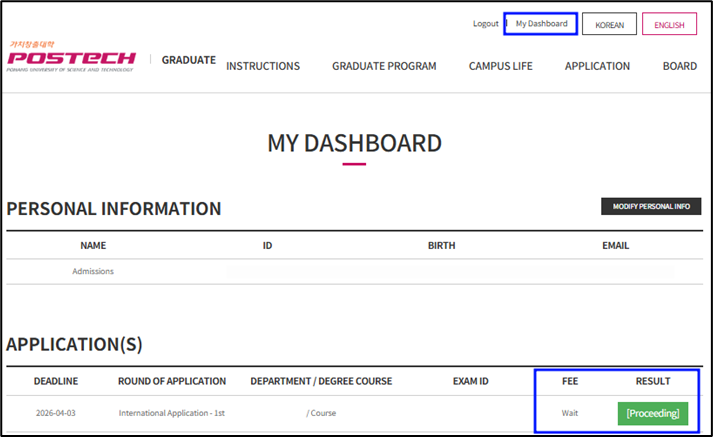
※ Notice: You must complete the application process by paying the application fee before the application period.
Even if you only complete the application, your results may appear as a green box that says "Completed."
Inquiry: Graduate Admissions (grad-admission@postech.ac.kr)